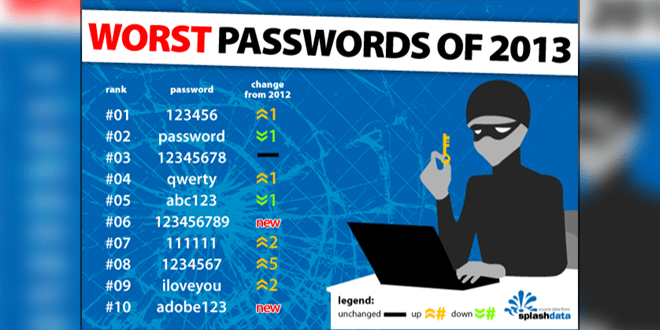
Last month I wrote about “Top 25 Worst Passwords“. If you are still using a weak password, you are an easy target for a hacker. Your online life is in great danger.
There is no use worrying after someone takes hold of your accounts, especially your online bank details. Basically your whole online life is at stake with weak passwords.
So do you know what a strong password means? There is nothing called hack-proof passwords. Every password can be cracked, but depending upon the complexity of the password, the time taken to crack a password can vary from 1 min to 1.49 million centuries.
Some of the best practices I use to protect my online life include using lower and upper case characters, using numbers and special characters, keeping password length more than 10 and changing passwords every 2 months.
Try to use different passwords for different sites, this reduces the risk of getting all your account hacked if one of the sites you use gets hacked and data is leaked. Recently the HeartBleed bug shook more than 60% percent of internet. Read more about this on the official site. No case of data leakage due to HeartBleed was reported. God knows how many sites were compromised before the bug was discovered. Better to change all the passwords. But before changing the passwords make sure that the website you are changing the password has rolled out a fix for the bug. It’s pointless changing the password before the server is fixed. You can check the blog of the site and find out whether they have fixed the issue. Most of the sites mailed it’s users about the bug and about the fix they have implemented.
Check out the infographic below and find out more practices you can do to create an ultra-strong password.

Source: WhoIsHostingThis?