Category: Tech

  • Will Free Email Service Hurt Your Business?

    Will Free Email Service Hurt Your Business?

    An average of 100.5 billion emails were sent and received during the year 2013.  Out of that 100.5 Billion were business (marketing) emails and 82.4 were personal. By 2017 overall email traffic is expected to reach 206.6B per day*. So if you haven’t got a custom domain and email for your business, it’s high time.

    Most of the businesses do have their own email, but they use free email services which they get from their server host or domain registrar. So what’s wrong with that, huh? This article will help you understand the cons of free email services which you get from hosting providers and domain registrar.

    Domain registrars advertise “50 free email accounts with all domain purchases”. And everyone falls for this. Ever wondered why Google charges $5 per user for their Business Apps? That’s because sending emails is not just a message being sent to one server from another. It involves multiple security checks. These checks include verifying the sender’s credibility, scanning for virus, etc. This is were free email services fail. These free services do not provide verification details for your email and the result will be, your email ending up in receivers junk folder.
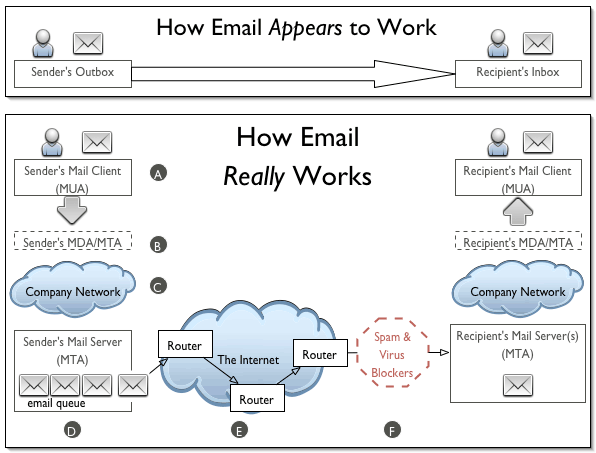
    How Emails Work? - Viral Media Today

    During the earlier stages of www.shortofthemonth.com, I used the free email from Godaddy which I got with the domain. I thought everything was going fine and one day I forwarded an email to my live.com account and it wasn’t delivered. Later found the email in the Junks folder. After this incident, I included  “Please acknowledge receipt of this email” along with the email signature. Noticed that only Gmail users responded back. I created a new live account and mailed to it from short of the month’s email and saw that it was being sent to junks folder. Tried the same with my Gmail account and the mails were delivered to the inbox.

    I contacted Godaddy and asked them about this. They responded, “You will have to contact live.com regarding this. There is nothing we can do regarding this as this is not our fault”. At first I thought this wasn’t their fault as Gmail was accepting the emails. I went to the Microsoft forum with this and still the issue wasn’t solved. For 3-4 months I had to sacrifice my emails which were sent to live.com.

    After 3-4 months I came across a banner ad about Google Business. Thanks to targeted advertising. I signed up for 30 day trial and Bam, all the emails were delivered directly to inbox. I mailed to live.com accounts and everything was delivered to the Inbox. This made me a fan of targeted advertising. Google knew what I needed and they delivered it. After the 30 day trial, I purchased Google Business and is really happy with it. We get more than what we sign up for.

    Think before using free email services. Small businesses who can’t afford paid email services can try Zoho Mail. They provide up to 5 free accounts and yes, emails will be delivered right to your customers inbox. I am using Zoho Mail for my personal website. Not all free email services are bad, but don’t use the one’s which you get with your server or domain.

    I even lost a $500 content writing opportunity for a big WordPress theme developer. When they contacted me, I was really excited and replied back that I am ready. I got their reply after 3 weeks and it said that they are sorry for replying late and that was because my reply to them was in the spam folder. They saw it that day and they had already got the person to write for them. Well, you learn from your mistakes.

    What do you think about free email services? Are you using one?

    *Source: Redicati
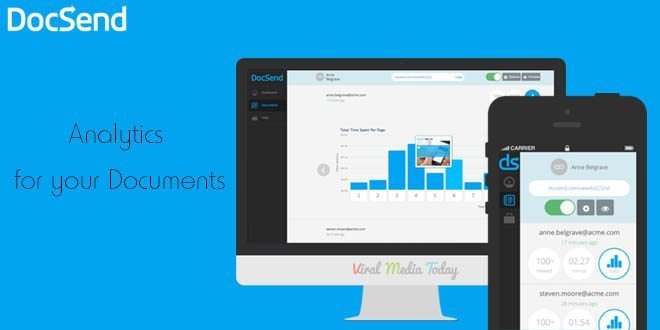
  • DocSend: Analytics for your Documents: First Impression (Review)

    DocSend: Analytics for your Documents: First Impression (Review)

    DocSend is a new startup based out of San Francisco. The company was founded by three Stanford computer science graduates. And on 6th May 2014 they launched at Disrupt NY. Currently they are in Beta and is only accepting users through invitations.

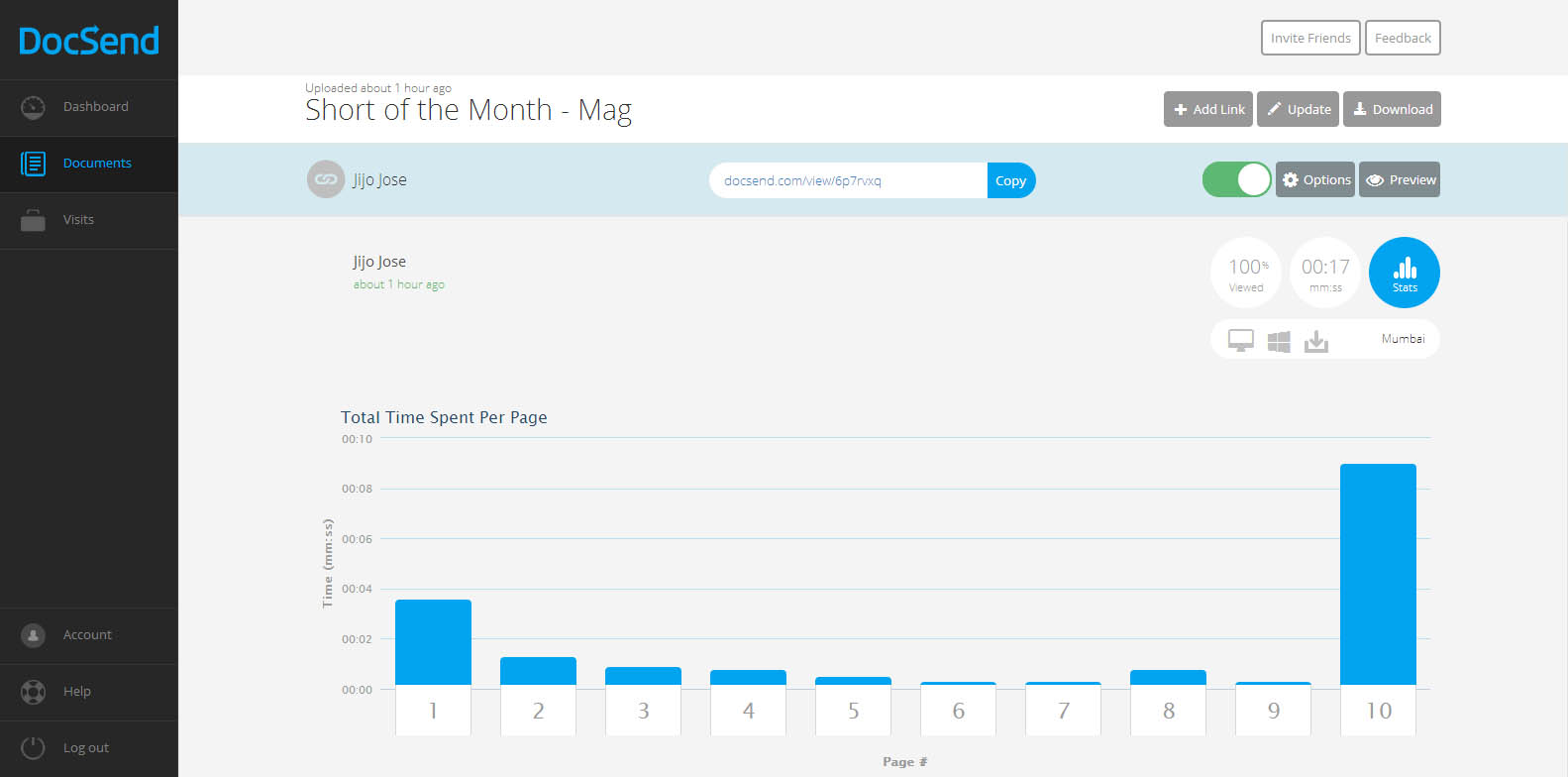
    DocSend is an analytics tool for our online documents. There was a point of time where I tried to add Google analytics code to one of my documents and failed hard. Still now I don’t know whether the document was opened or not. But from now that’s not going to be the case. DocSend is going to give us all the data about our documents we send online. It will track and report number of views, location, operating system, the duration of each page view, etc…

    DocSend -  Analytics for your Documents - First Impression - Review

    So how does DocSend work?

    In simple words, You upload a PDF file to DocSend, they give you a unique link for each person or group you want to share the document with. Copy the link share with the individual or the group. Once they open the link you will start seeing numbers in your dashboard. Once one of your recipients open the document, you receive an email alert.

    What can be tracked?

    1. Duration of each page view
    2. Location
    3. Operating System of the viewer
    4. Device used by the viewer
    5. Name of the person or group who viewed the document(You have to ask the viewer to provide this data)

    DocSend -  Analytics for your Documents - First Impression - Review

    We get an instant notification as soon as someone opens the document. Update the document anytime you want, the viewer always gets the updated version even after sending the link before updating. Don’t know whom you are going to share the link with? Don’t worry, DocSend allows us to collect Name, Email and company of a viewer. Viewers are asked to enter these details before viewing the document. You can set expiration date and password also.

    They have integrations with DropBox, Google Drive & Box planned for the future. Currently they only support PDFs, I am sure more file formats will come to DocSend soon.

    You really don’t have to break your head figuring out DocSend’s tracking report. Everything is user friendly that even a 8 year old can track his documents. Even DocSend’s HTML viewer (this is what your viewer will use to see the document you send) is designed very user-friendly.

    Worried about security of your documents? Don’t worry, they are using a 128-bit encryption to protect our documents.

    I am really impressed with DocSend’s service. I hope they keep a free plan once they go public. If anyone wants invitation to DocSend let me know through the comments and I will send you an invitation. Or you visit DocSend and leave your email there. DocSend will send you an invitation. Don’t fall for those “Get Invitation to DocSend” or “Get access to DocSend” Pranks.

    All the best to DocSend team. Waiting for more updates guys.

  • Finally, Skype Group Video Calling is Free for Everyone

    Finally, Skype Group Video Calling is Free for Everyone

    Skype announced that they are making the group video calling feature free. Previously it was a premium feature. Google Hangouts, the rival service have been offering group video calling since its launch and finally Microsoft decided to join the club. Skype group video calling allows users to participate in video chats with up to 10 people using PCs or Macs. For years Skype users have been requesting free group video calling and now Windows desktop, Mac and Xbox One users will be able to use the service for free. “In the future, we’ll be enabling group video calling for all our users across more platforms,” says Skype’s Phillip Snalune.

    I always prefer Skype over Hangouts and only used Hangouts if I had to make a group video call. Like me, this free feature will be a blessing for millions of Skype users out there. Free calling is now enabled on all the platforms mentioned above. I am glad that they didn’t take much time to roll out the feature to all.

    As I mentioned earlier, this feature was only available for premium users for a monthly subscription of $8.99 and for the single day subscription it will cost you $4.99. We will have to wait and see how this new decision is going to help Skype to position themselves more competitively against rival Google Hangouts and other group video calling services.

    To read more about this visit Skype’s blog.

    Image Credit: Bloom Productions/Getty Images


  • Make an Alumni Association Website with WordPress & BuddyPress: Beginners Guide

    Make an Alumni Association Website with WordPress & BuddyPress: Beginners Guide

    WordPress is one of the best and powerful CMS out there, combine WordPress with BuddyPress, you get your own community website. Social elements in BuddyPress are good and also gives us full control over every element. BuddyPress comes from the same family of WordPress. When we planned to make our school’s alumni association website we contacted  a couple of developers and was shocked by their pricing. We didn’t have a large budget for this. Later I came across BuddyPress and was surprised to see its potential and the great part was it’s free. Everyone loves free stuff.

    In this article I will show you how to install BuddyPress and set up an alumni site. I am assuming that you have a server and you have installed WordPress. This article will start from installing BuddyPress, so if you don’t have a WordPress installed server, head over to BitNami. They will help you set up a server on your computer locally. Will explain about that in another article.

    Let’s Begin.

    1. Installing BuddyPress

    Make an Alumni Association Website with WordPress & BuddyPress: Beginners Guide: Viral Media Today
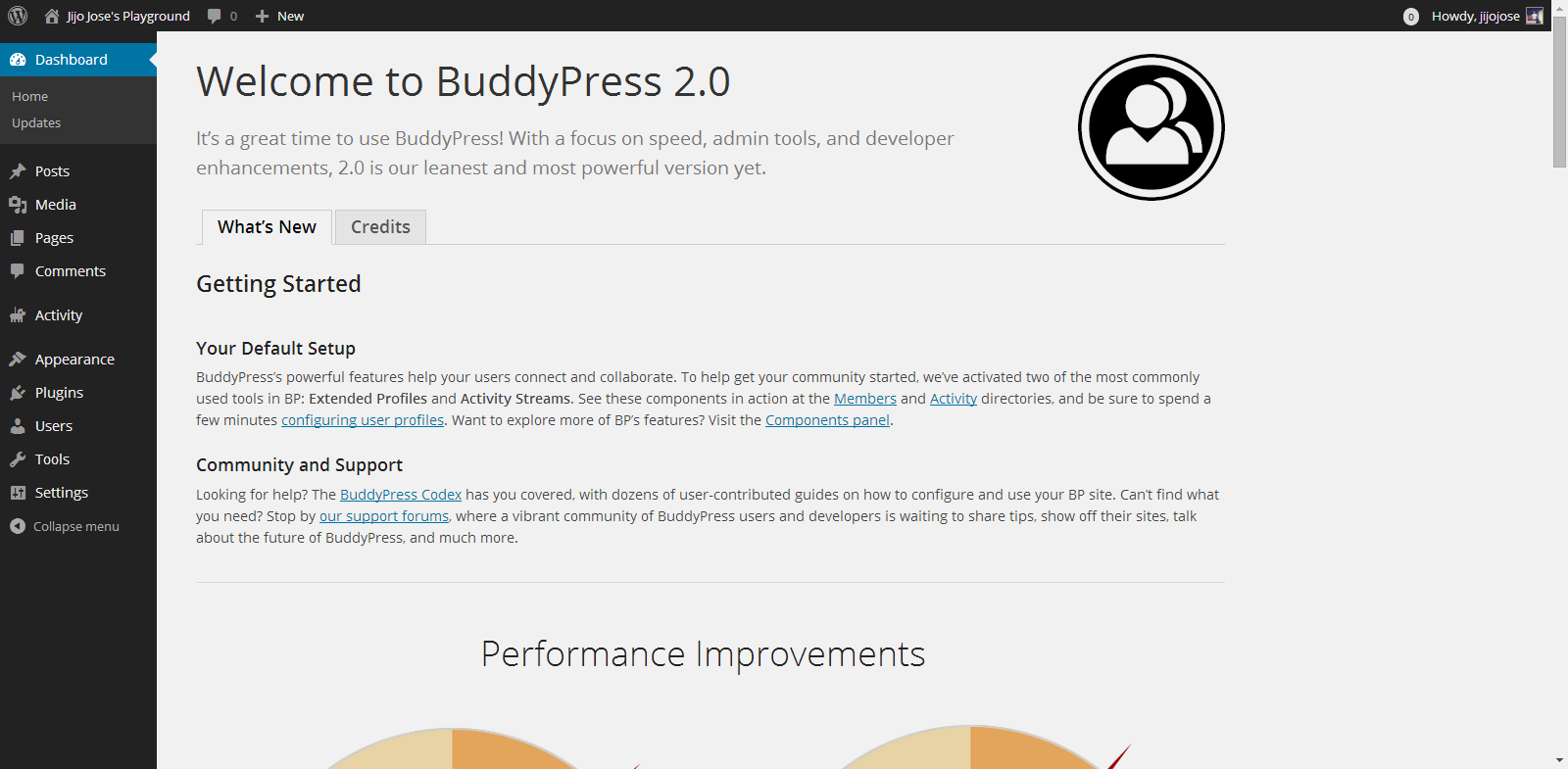
    You can download BuddyPress from WordPress Plugin repository or from the BuddyPress official website. Or directly download it to your WordPress installation by going to plugins from your website back-end. (Plugins>Install Plugins). Activate the plugin. Once activated you will get the above screen.

    2. Selecting the components

    Make an Alumni Association Website with WordPress & BuddyPress: Beginners Guide: Viral Media Today
    Go to Settings>BuddyPress
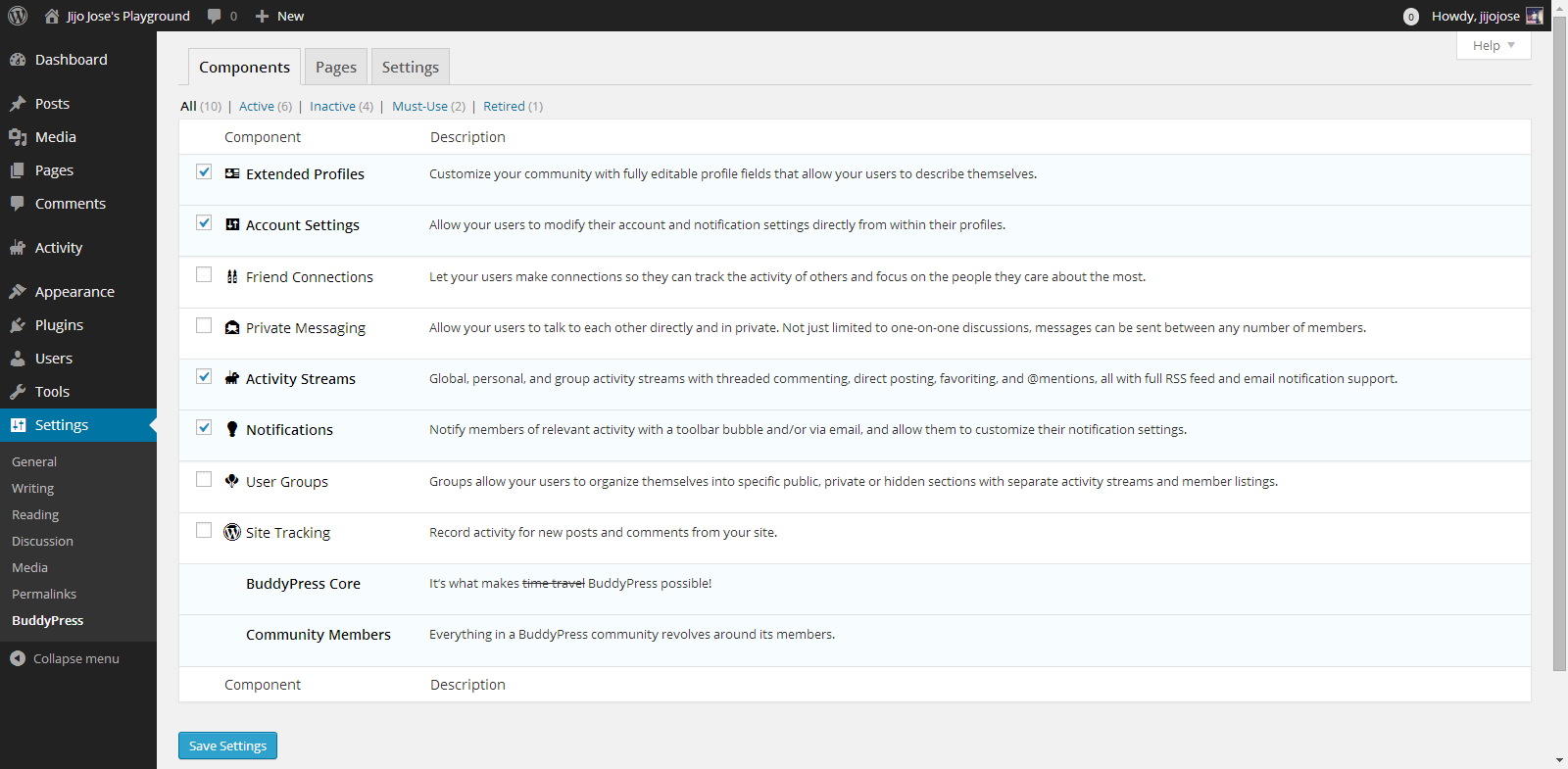
    Choose what components you want to use in your BuddyPress installation. In other words what all services do you want to run on your alumni association website. Each component has a pretty neat description on the right side that will help you in selecting the components.

    3. Creating Pages

    Make an Alumni Association Website with WordPress & BuddyPress: Beginners Guide: Viral Media Today
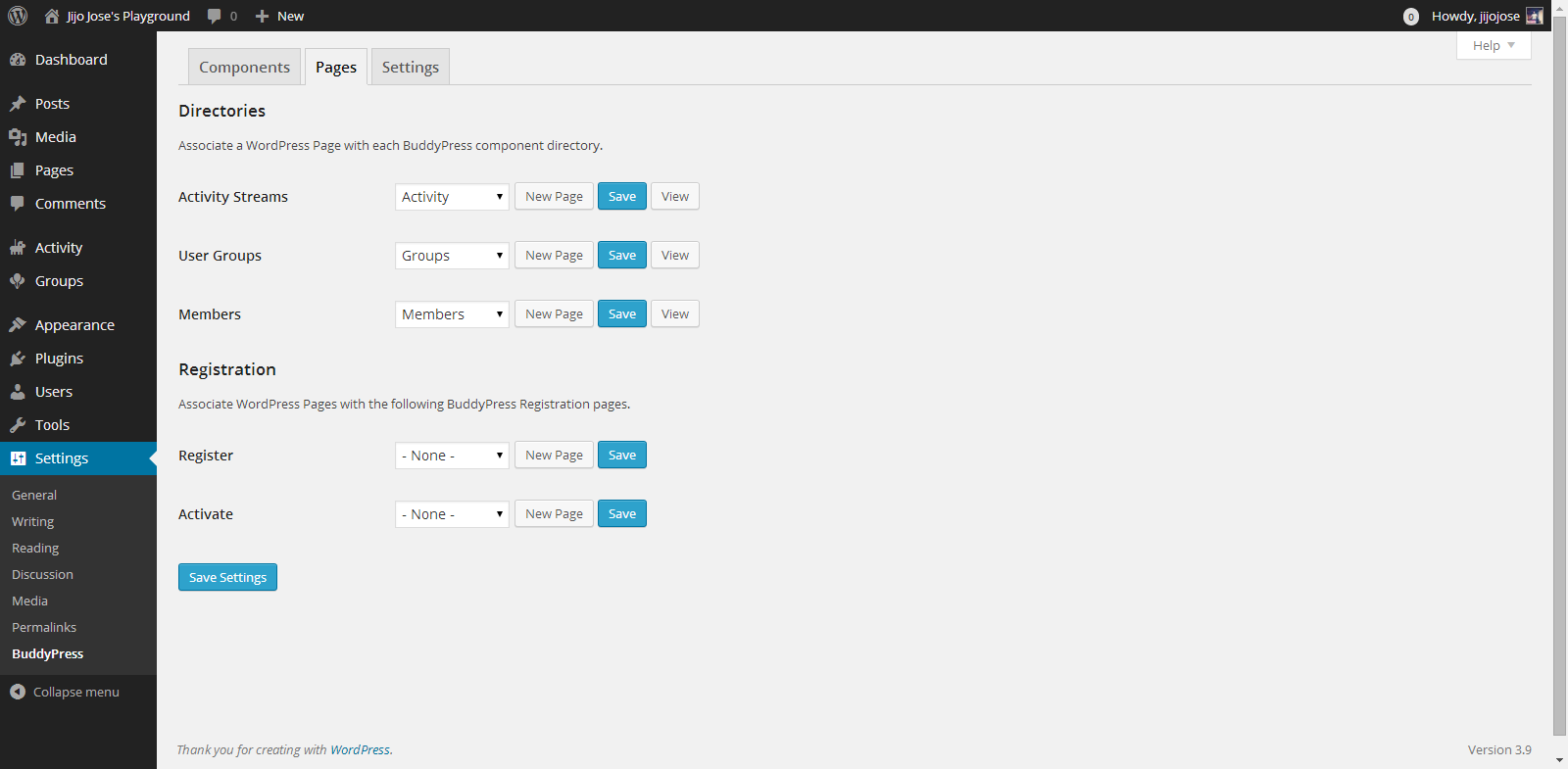
    Go to Settings>BuddyPress>Pages
    This is one of the important steps. In this page we will create and assign some important pages for activity streams, user groups, members page, registration and activation page. Upon activation BuddyPress will create activity streams, user groups and members page, now we will have to create and assign pages for registration and activation page.

    Make an Alumni Association Website with WordPress & BuddyPress: Beginners Guide: Viral Media Today

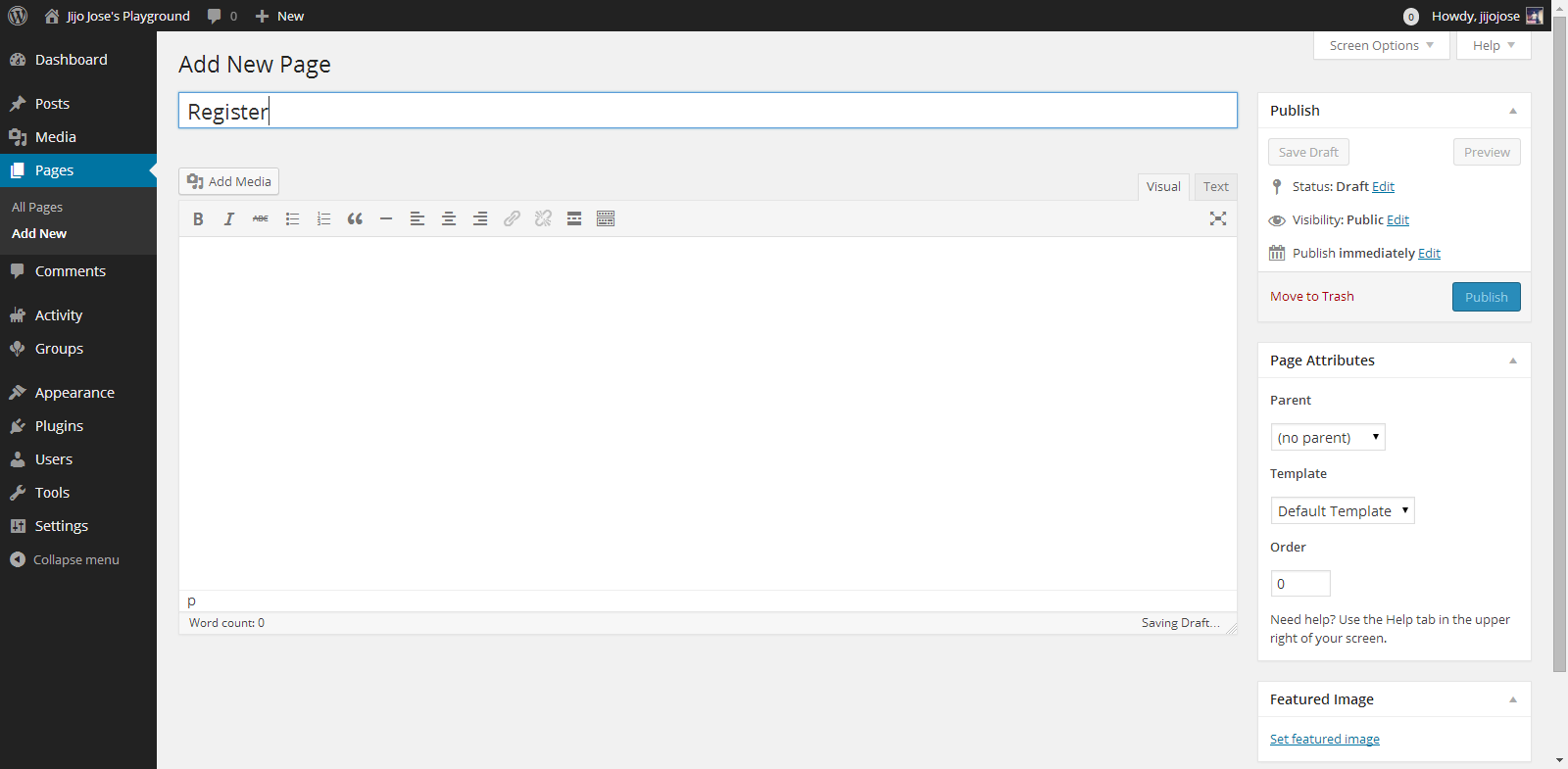
    Click on New Page, you will be taken to “Add New Page“. Create 2 pages, one for Registration page and another for Activate page. Naming the page is up to you. Once you finish creating the pages go back to BuddyPress pages (Settings>BuddyPress>Pages).

    Associate the correct pages for Registration and Activate page and click “Save Settings“.
    Visit the newly created pages and check whether they are working as intended.

    4. Final Tweaks/Settings

    Make an Alumni Association Website with WordPress & BuddyPress: Beginners Guide: Viral Media Today
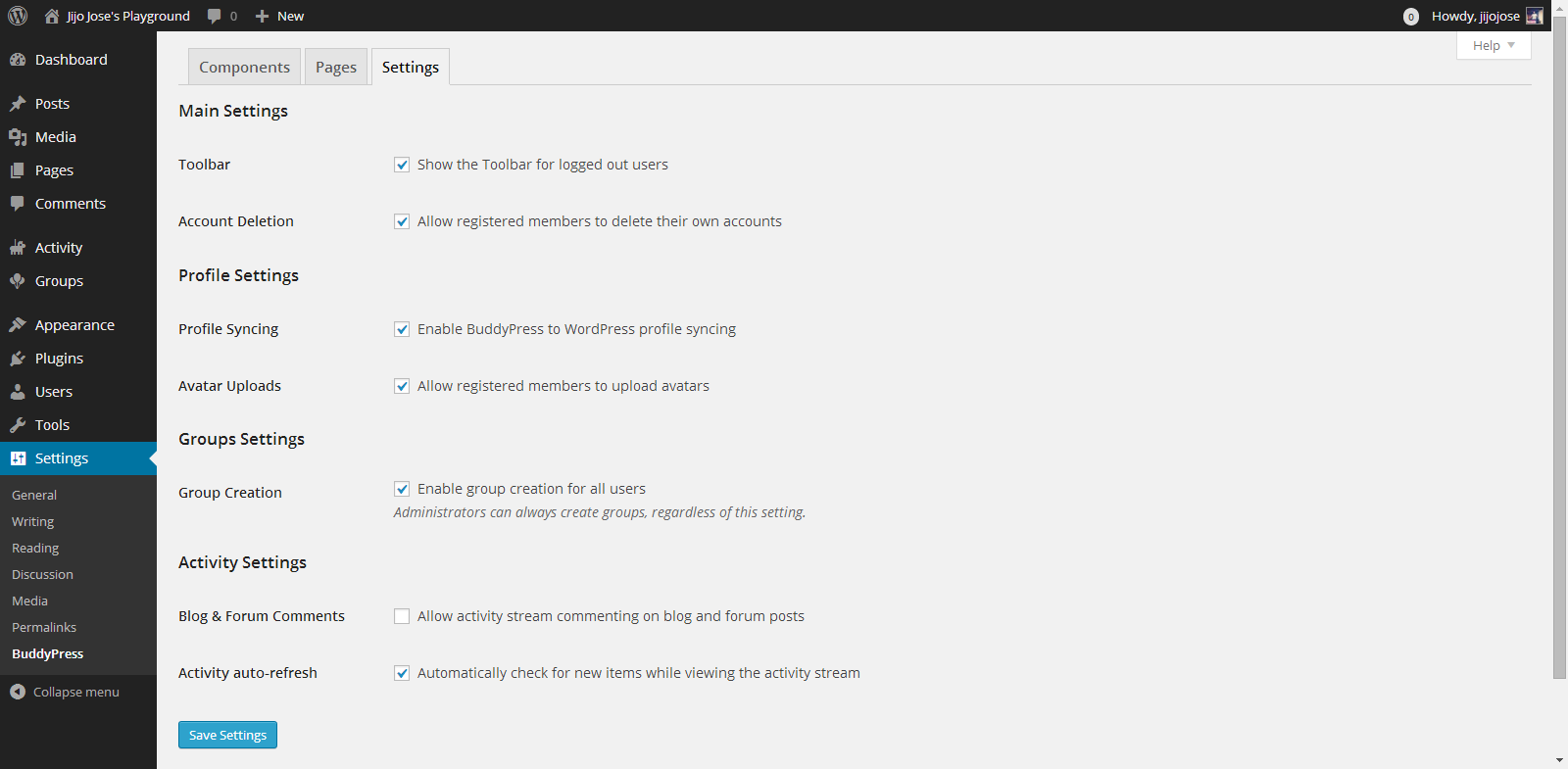
    BuddyPress gives control over how users interact, what they can see and what they can create on the site.
    Go to Settings>BuddyPress>Settings
    Again the developers have done a good job of explaining each option properly.

    Your alumni site is almost ready. An important thing we are missing now is a theme for your site. The default theme is not optimized for BuddyPress. Although everything looks clean if you check the site, but you are missing lots of features. An optimized theme will give your users a good experience.

    5. Selecting a BuddyPress theme

    You either can get a free BuddyPress compatible theme from the WordPress theme directory or Buy premium themes from any WordPress theme marketplace. I’ve tested some premium themes, you can read about some premium themes on this article.

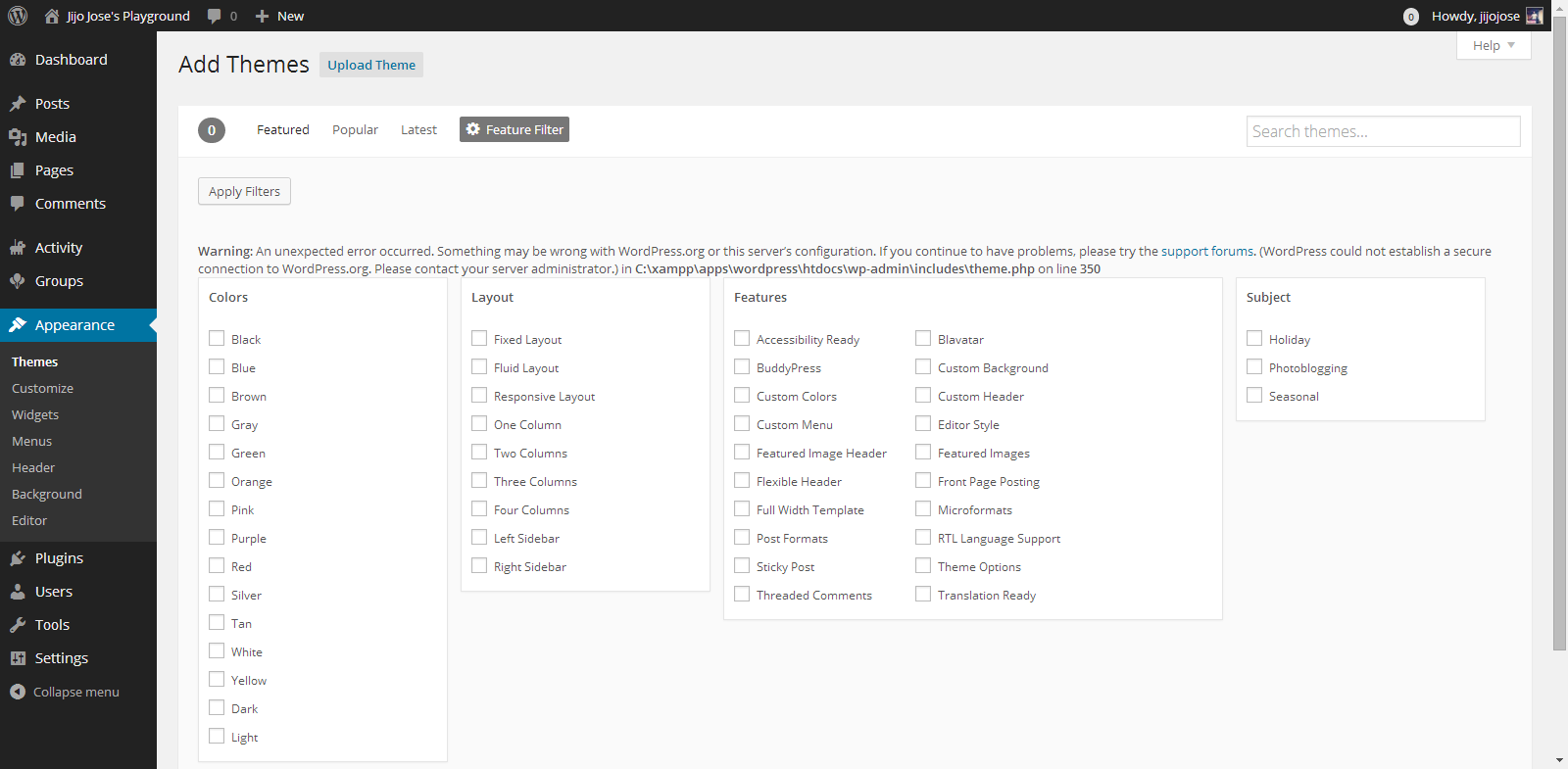
    For now let’s use some free themes from the WordPress themes directory. Head over to “Appearance > Themes“. Click on “Add New” and in the filter section, select “BuddyPress”, hit “Apply Filters“.

    Make an Alumni Association Website with WordPress & BuddyPress: Beginners Guide: Viral Media Today

    Select a theme you like and apply. You are all ready to go. Before releasing your site to the public ask some of your friends to register and explore the site. Get feedback from them and make tweaks accordingly. Also leave your site address in the comments, I will check out the site and will try to give some suggestions.

    If you get stuck following these steps, let me know and I will personally help you clarify it.

  • WP Super Cache or W3 Total Cache – Which WordPress Cache plugin is Better?

    WP Super Cache or W3 Total Cache – Which WordPress Cache plugin is Better?

    If you are WordPress site owner and wants to increase the site speed you would have definitely tried some caching plugin. Also, you might have come across some WordPress cache plugins too. Top players in caching plugins are WP Super Cache and W3 Total Cache. WP Super Cache has more than 5,535,472+ downloads and W3 Total Cache has more than 3,095,642+ downloads. So let me repeat the question again WP Super Cache or W3 Total Cache – Which is Better?

    Some of you might think WP Super Cache has more downloads so it is better. There is a reason why WP Super Cache has more downloads than W3 Total Cache. The reason is simple, it is very easy to use it. Even W3 Total Cache is easy to use, but needs some little more work. May be 1-2 minutes extra then WP Super Cache.

    I was a lazy ass and used WP Super Cache and was happy with the boost in speed I got. Used WP Super Cache for all my sites. But last week when I was updating my personal blog jijojose.com just fun, I disabled WP Super Cache and installed w3 Total Cache. Then I tested the page speed on GTmetrix, I was amazed to see the results. That was the first time I saw green color on my page speed results. After seeing the results I wanted to install W3 Total Cache on all my sites powered by WordPress.

    As a result, I installed it here on Tech Kunji but before installing I did a test on GTmetrix. Check out the result. After installing W3 Total Cache the result was improved almost 10%. Not a big difference for us, but Google bots considers this. Check out the new result.

    You can compare the results here. Note that the right one is WP Super Cache and Left one is W3 Total Cache.

    I recommend W3 Total Cache for both new and experienced WordPress users. New users just enable the basic features and if you are experienced go crazy and optimize your server as much you want. So which is the best WordPress cache plugin according to you?

    Got something to say? Let me know through the comments. 

  • Flappy Bird APK Free Download

    Flappy Bird APK Free Download

    Past few days Flappy Bird was all around the Internet. Unfortunately Dong Nguyen, the creator of the game decided to take down the game. He tweeted this:

    I don’t understand why he had to take the game down. In a previous tweet he said the press is overrating his game.

    I was lucky(not really) enough to get the game before it was taken down. Today I was talking about the game to my friends and they wanted to try it but couldn’t find it on App Store & Google Play. Google play has some alternatives, but I warned them about the infected apps. Some Flappy Bird rip-offs are infected.

    Find the download link below. I’ve scanned this Apk with several anti-virus, so don’t worry. You can directly download this apk to your mobile.

    [ibs text=”Download Flappy Bird” tooltip_text=”” color=”black” icon=”download” border_radius=”small_radius” size=”large” link_url=”http://download1453.mediafire.com/xob1iehpoxag/l0u55yv3t32j0mc/Flappy_Bird_v1.3.apk” link_target=”_blank”]

  • WhatsApp Prank Apps List – Android

    WhatsApp Prank Apps List – Android

    We all love to prank our friends. Wouldn’t it be cool if we could prank them online. Below find 2 apps which will help you fool your friends using WhatsApp. These apps are for Android and I am not sure whether it is available for Apple products. These WhatsApp Prank apps may not work after certain updates of WhatsApp. Please be patient till the developers fix it. Don’t flood my inbox with questions regarding fixing the app.

    WhatSaid

    WhatSaid will help you create fake conversations which never happened and share with your friends as screenshots. Every single element of this app is editable giving you full control.

    Fool Your Friends with WhatsApp Fake Conversation Prank - App Screeshots

    Read more about WhatSaid here.

    MagiApp

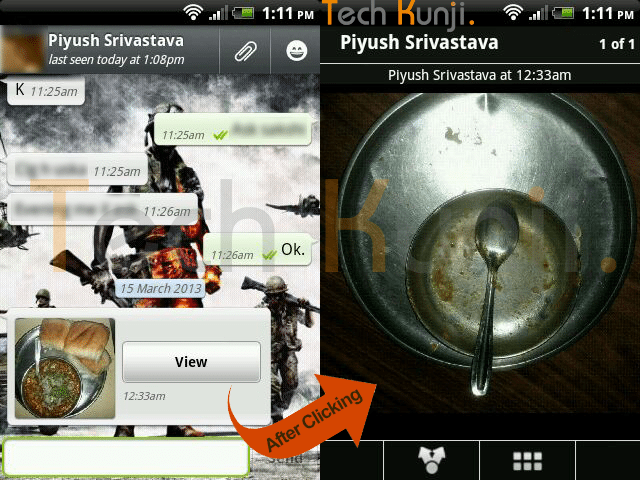
    The app allows us to hide an image in the thumbnail and share it with your WhatsApp friends. After most of the WhatsApp update MagiApp breaks and will have to wait till MagiApp developers release an update.

    WhatsApp double Image Prank

    Read more about MagiApp here.

    Please contact me if you need help but if the app is not working because of an update I won’t be able to help you.

  • Top 25 Worst Passwords of 2013

    Top 25 Worst Passwords of 2013

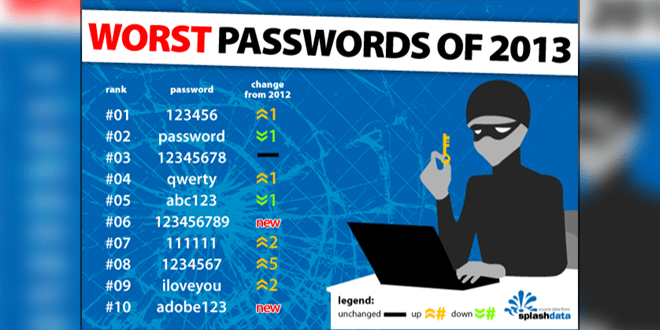
    SplashData has revealed their annual “Worst Passwords” list for 2013. They have published 25 worst passwords and also added that 2013 was the year which saw the most cyber crime. 123456, password, 12345678, qwerty and abc123 are the 5 top most worst passwords on the list. SplashData used the data from adobe’s breach few months back.

    Below, check out the 25 worst passwords.

    1. 123456

    2. password

    3. 12345678

    4. qwerty

    5. abc123

    6. 123456789

    7. 111111

    8. 1234567

    9. iloveyou

    10. adobe123

    11. 123123

    12. admin

    13. 1234567890

    14. letmein

    15. photoshop

    16. 1234

    17. monkey

    18. shadow

    19. sunshine

    20. 12345

    21. password1

    22. princess

    23. azerty

    24. trustno1

    25. 000000

    If your password is the above list, it’s time to change it. 🙂

    Source: SplashData

  • Fool Your Friends with WhatsApp Fake Conversation Prank

    Fool Your Friends with WhatsApp Fake Conversation Prank

    One of the most read article here on Viral Media Today is my “Fool Your Friends With WhatsApp Hidden Image Trick” article. Today I will introduce you to a new App which helps us to create fake WhatsApp Conversations. So, lets Fool your friends with WhatsApp fake conversations.

    The App’s name is Whatsaid, developed by Totem Studio

    Basically this app will help you create fake conversations which never happened and share with your friends as screenshots. Cool, right?

    Fool Your Friends with WhatsApp Fake Conversation Prank - App Screeshots

    Every single element of this app is editable giving you full control. You change the display picture, last seen date, conversation date, background image. When you open the app for the first time you will be taken through a small interactive tutorial. After creating fake conversations the app allows us to share the image with our friends.

     The only feature missing is the option to add images to conversations. Hope they add it soon. Also, most of the emoticons are missing. But still the app does a good job in pranking your friends.

    You can download the app from Google Play for free. Download link below.

    [ibs text=”Download Whatsaid” tooltip_text=”” color=”black” icon=”download” border_radius=”small_radius” size=”large” link_url=”https://play.google.com/store/apps/details?id=com.tommiAndroid.WhatSaid&hl=en” link_target=”_blank”]

    Enjoy fooling your friends. Share the fake conversations you created, with us. 😉

  • Password Protect a Website or Sub-directory: Steps

    Password Protect a Website or Sub-directory: Steps

    Recently I was setting up a back-end admin page for a site and I wanted it to be only accessible by admins. So I came across an article by Chris Coyier on css-tricks.com. But the article was for advanced users. A newbie like me will end up getting errors. I ended up getting 500 Server error and after hours of Googling I was able to set it up properly. Follow the steps below and you will be able to password protect a website or sub-directory in no time.

    Steps:

    Creating .htaccess and .htpasswd files

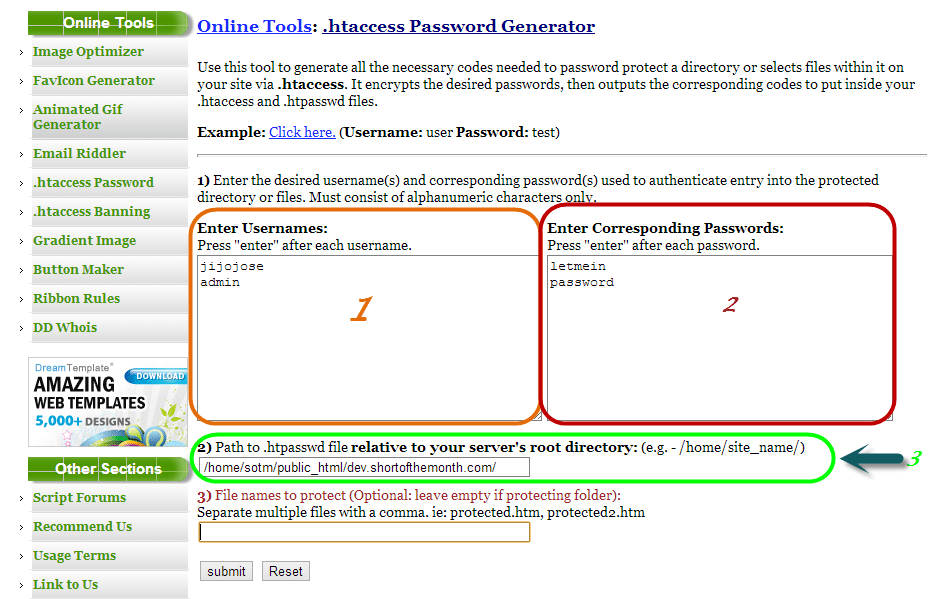
    Visit http://www.tools.dynamicdrive.com/password/ to generate the contents for your .htaccess and .htpasswd files. It’s a free online .htaccess Password Generator.

    password protect website

    1. Enter usernames, one per line
    2. Enter passwords for the usernames on the left
    3. Enter filepath where you will be storing your .htpasswd (If you don’t know the filepath, read the end of the article).
    4. Submit

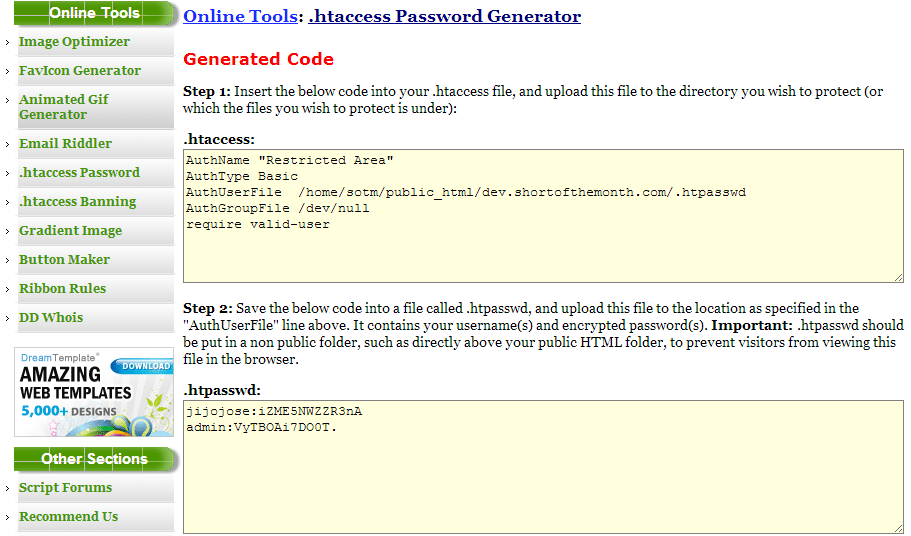
    After submitting you will get a page with your .htaccess and .htpasswd codes.

    htacces password generator

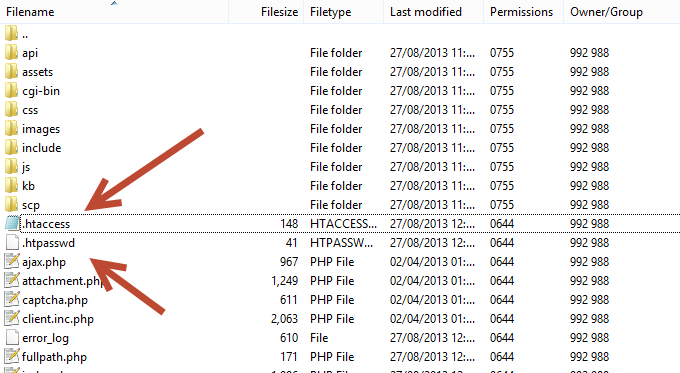
    Create 2 files .htaccess and .htpasswd in the file directory you want to protect and copy paste the codes from the above site to the respective file.

    htaccess location for password protection

    Finding the path of of the folder where you will be storing your password file (.htpasswd)

    This is for people who don’t know the full path of your site directory.

    Visit http://www.htaccesstools.com/articles/full-path-to-file-using-php/ and follow the instructions to find your full path of your site directory.

    I have tried to keep the steps as simple as possible. If you run into some error, let me know through the comments and I will help you sort it out.